01 / COMPOSE
Bring your sources together.
Combine camera and media layers. Adjust rotation, zoom, and framing in one focused workspace.
Explore Studio VCamory
VCAMORY STUDIO DESKTOP TO IPHONE
Build a scene on your Mac or PC. Your jailbroken iPhone shows it as its camera — over Wi-Fi or USB.
Requires a compatible jailbroken iPhone.
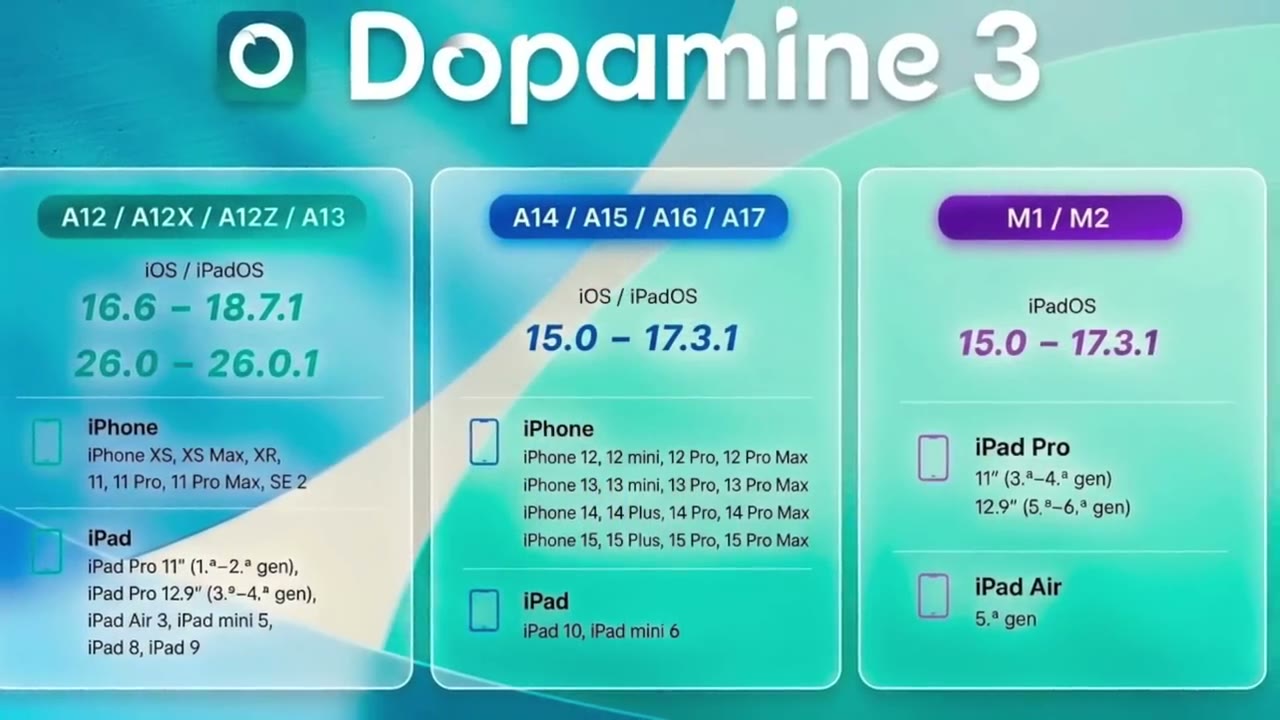
Check your model, iOS version, and jailbreak.
THE WORKSPACE
Compose on the big screen.
Keep control on your iPhone.
Combine camera and media layers. Adjust rotation, zoom, and framing in one focused workspace.
Explore StudioGo wireless over Wi-Fi, or choose the USB + Wi-Fi edition for a wired connection and wireless flexibility.
Compare connection plansUse the floating VCamory Link button on your iPhone to sign in, select your source, and reach the controls.
See the setupBEFORE YOU BEGIN
VCamory needs a compatible jailbroken iPhone and the matching package. Check your exact model, iOS version, and jailbreak before choosing a plan.
 8 MIN · SETUP WALKTHROUGH
FIND YOUR PLAN
iOS 26 is here: USB Monthly & USB Lifetime.
Pay from your wallet with USDT.
Minimum top-up $25 — unused balance stays in your wallet. 48-hour refund if the plan has not been activated or downloaded. Questions? Ask on Telegram.
No. VCamory needs a compatible jailbroken iPhone, a supported iOS version, and the correct package. Device and jailbreak requirements vary. Check the setup guide before buying.
Yes. The available Wireless and USB + Wi-Fi editions use VCamory Studio on Mac or Windows to send your scene to the iPhone. iOS 26 USB Lifetime also includes Gallery for photos and videos selected on the iPhone.
Wireless Monthly connects over Wi-Fi. USB Monthly adds a wired connection. Lifetime plans are arranged with the admin. Compare the plans.
Sign in to your VCamory account and open Downloads. Choose the installer for your computer and the package that matches your iPhone setup and plan.
If you had an active VCamPro subscription or a wallet balance, your account has been moved to VCamory. Sign in with your existing username and password. New customers can create a VCamory account.
Add USDT to your wallet through Cryptomus (minimum top-up $25), then buy a plan from your wallet. Checkout shows the network and exact amount. Unused balance stays in your wallet.
Check the setup guide before paying. If you already paid and nothing was activated or downloaded, ask for a refund within 48 hours.
Each account gets one iPhone package download and one Studio installer download, covering all versions. If a transfer fails, contact support and it is restored after review.
A 48-hour voluntary refund applies to new purchases that have not been activated or downloaded. Email support from your account email with your username and invoice reference. Full policy.
Wireless Monthly connects over Wi-Fi. USB Monthly adds a cable connection. Lifetime plans are arranged with the admin. Both connection modes use VCamory Studio on Mac or Windows.
Gallery is included in iOS 26 USB Lifetime. Select a photo or video from your iPhone to use as the camera source, without a computer.
YOUR NEXT FRAME STARTS HERE